What Is a Zero Result Search and Why Is It Costing You Sales?

A zero-result search happens when a shopper enters a query into an e-commerce search bar and gets no matching products or useful results. It often occurs because the search engine cannot understand the shopper's intent, even when relevant products exist in the catalog.
A shopper lands on your store, types exactly what they want into the search bar, and gets nothing. No products. No suggestions. Just a blank page or a generic "no results found" message.
That's a zero result search, and it's one of the most expensive, least monitored problems in ecommerce. The shopper didn't bounce because they weren't interested. They bounced because your search engine couldn't understand them.
Key Takeaways
A zero result search is any on-site search query that returns no matching products, even when the item exists in your catalog.
Roughly half of ecommerce sites turn a "no results" page into a dead end, with no path back to a product.
Shoppers who hit a failed search are more likely to leave and buy from a competitor, and many won't come back.
Most zero result searches aren't a catalog problem. They're a vocabulary problem between what shoppers type and what your search engine can match.
Fixing zero result searches means both preventing them (better query understanding) and recovering from them (smarter no-results pages).
Table of Contents
- What Is a Zero Result Search?
- Why Do Zero Result Searches Happen in Ecommerce?
- How Zero Results Impact Ecommerce Revenue
- How to Fix Zero Result Searches
- How AI Search Helps Prevent Zero Results
- How to Track Zero Result Searches
- FAQs
What Is a Zero Result Search?
A zero result search is any query typed into your site's search bar that returns zero matching products, even when the product exists somewhere in your catalog.
It's different from a shopper simply not finding what they want because you don't carry it. In a true zero result search, the mismatch is usually one of these:
Vocabulary gap – the shopper searches "sneakers," your product titles say "trainers"
Typo intolerance – one misspelled character returns nothing instead of a close match
Attribute or thematic search – queries like "waterproof hiking boots" or "gift for new mom" that describe a need rather than a product name
Missing synonym handling – brand abbreviations, plurals, or regional spelling variants aren't recognized
Overly literal matching – the engine requires an exact string match instead of understanding intent
In every one of these cases, the product is often sitting right there in the catalog. The search engine just couldn't connect the shopper's words to it.
Why This Keeps Happening
Search Type | Example | Why It Fails |
|---|---|---|
Typo searches | "samsng phone case" | Exact matching cannot interpret mistakes |
Synonym searches | "trainers" instead of "sneakers" | Catalog language differs from shopper language |
Natural language searches | "black dress for wedding guest" | Query describes intent, not product name |
Attribute searches | "waterproof boots under $100" | Search cannot combine product attributes |
Product compatibility searches | "charger for iPhone 15" | Product relationships are missing |
Most site search engines, especially the default search that ships with ecommerce platforms, are built on keyword matching. They look for the literal words in the query inside product titles, tags, and descriptions. If the words don't line up exactly, the engine returns nothing rather than guessing.
That's a brittle system for how people actually search. Real shoppers don't search in product-catalog language. They search the way they'd describe something to a friend: loosely, imprecisely, sometimes with a typo, sometimes with a full sentence.
Baymard Institute's ongoing search UX research backs this up structurally, not just anecdotally. Their benchmarking found that nearly 50% of sites fail to provide users with effective ways to recover from a search that yields no results. That's not a small subset of poorly built stores. That's roughly half the industry treating a failed search as a dead end instead of a fixable moment.
How AI Search Helps Reduce Zero Result Searches
Traditional ecommerce search systems were built around keyword matching. They look for exact words across product titles, descriptions, tags, and categories. When shopper language does not match catalog language, the search engine often returns no results, even when relevant products exist.
AI-powered search takes a different approach. Instead of only matching keywords, it understands the meaning behind a query and connects shoppers with relevant products based on intent, context, and relationships between terms.
Traditional Search | AI-Powered Search |
Matches exact keywords | Understands shopper intent behind a query |
Requires shoppers to use catalog-specific terms | Recognizes how customers naturally describe products |
Depends heavily on manually created synonym lists | Identifies relationships between related terms |
Struggles with conversational searches | Handles natural language queries |
Often fails with typos and keyword variations | Understands spelling variations and related phrases |
For example, a shopper searching for “comfortable shoes for standing all day” may not use the exact product terms listed in a catalog. A keyword-based search system may fail to connect that query with relevant products, while an AI-powered search system can better understand the shopper’s intent and surface suitable options.
This is why ecommerce search is moving beyond traditional keyword matching toward AI-powered systems that understand context, language patterns, and shopper behavior instead of relying only on exact word matches.
Platforms like Growsearch use AI-powered search capabilities to help ecommerce stores improve product discovery, reduce zero-result searches, and connect shoppers with relevant products based on how they naturally search.
The Real Cost of Zero-Result Searches
It's easy to file zero-result searches under "minor UX annoyance." In ecommerce, these zero results are not just search issues; they represent lost purchase opportunities. Zero-result e-commerce problems usually happen when search technology cannot connect shopper language with available inventory.
The data says otherwise.
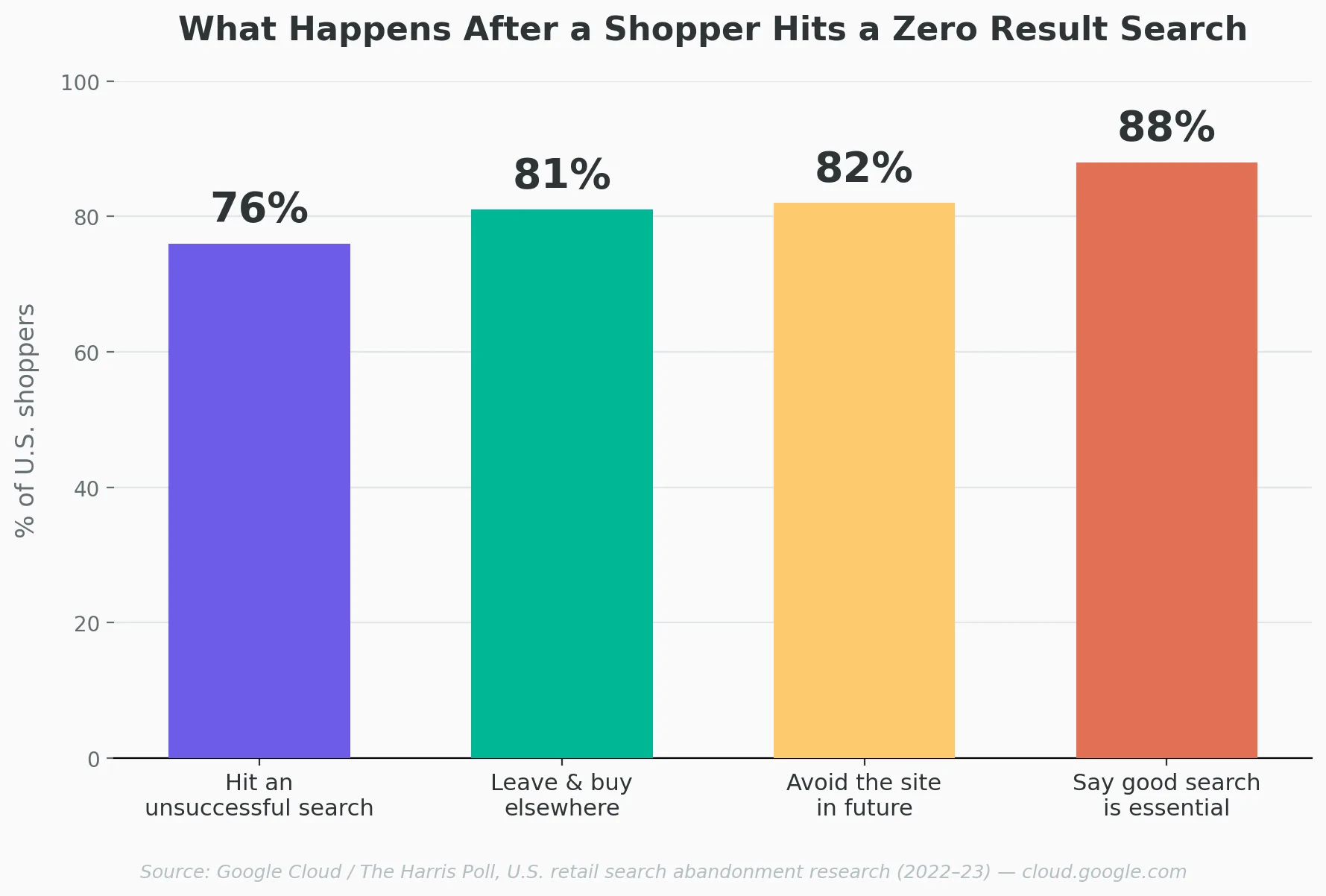
Search abandonment (a shopper searching, finding nothing useful, and leaving) has been studied at scale by Google Cloud through Harris Poll surveys of U.S. and global shoppers. A few numbers worth sitting with:
U.S. shoppers say the search bar is their most common way to shop on a retail site, ahead of general browsing
88% of consumers say a good search function is very important or essential when visiting a retail site
Only 12% of U.S. shoppers say they consistently get exactly what they're looking for when they search, and only 11% say they consistently get good alternatives
76% of U.S. consumers reported an unsuccessful search on a retail site, happening an average of four times in a single month
81% of U.S. shoppers say they're more likely to leave the site and buy the item elsewhere after a failed search
82% say they actively avoid sites in the future where they've had a bad search experience
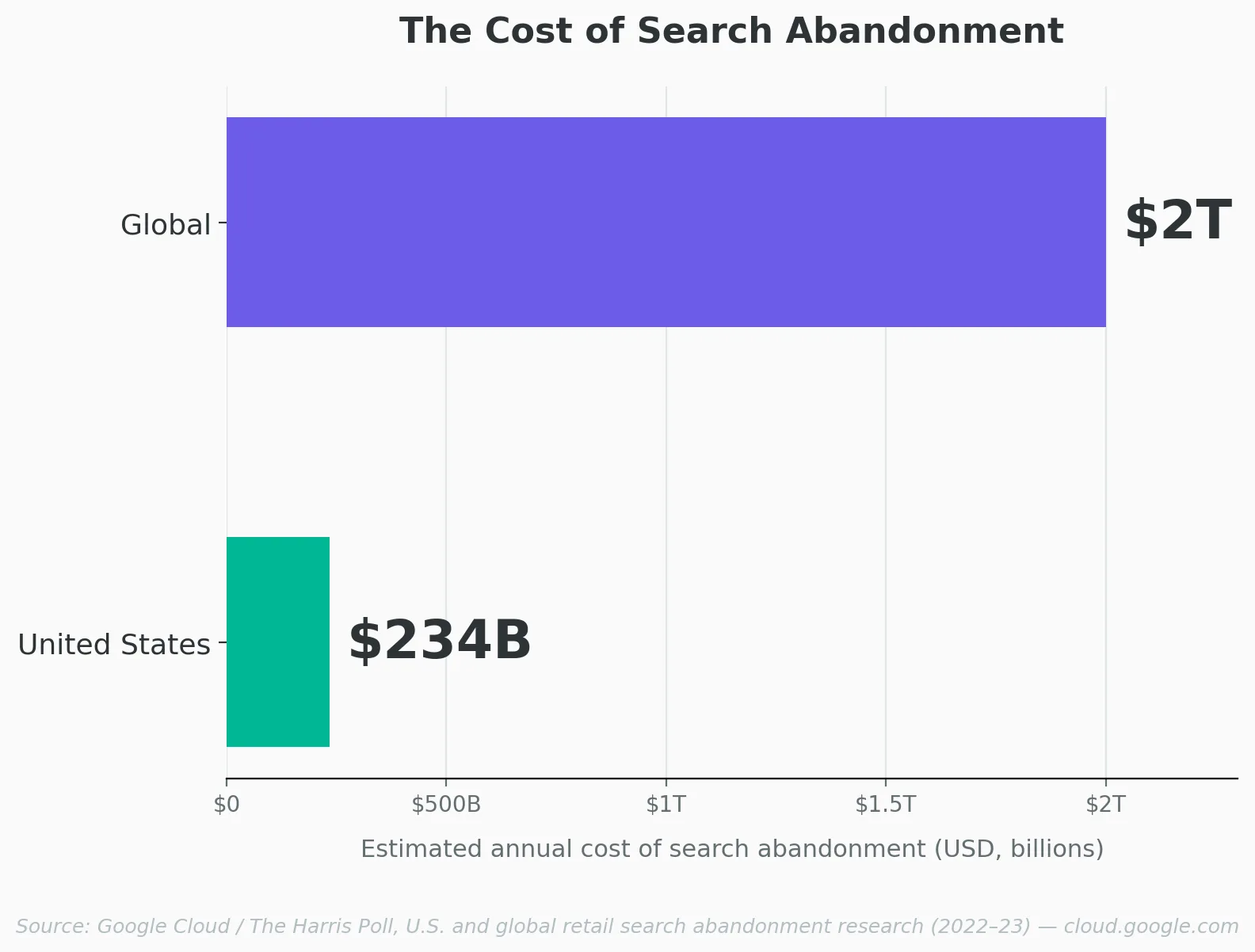
The financial toll lines up with the behavior. Search abandonment is estimated to cost retailers more than $234 billion annually in the U.S. alone, and over $2 trillion globally. That's not a rounding error in a conversion report. That's a structural leak sitting inside your highest-intent traffic.
Here's what makes it worse: shoppers who use search are already telling you what they want to buy. They didn't wander in to browse. They typed a specific product into a box. A zero-result search takes the most qualified visitor on your site and hands them nothing.
How to Fix Zero Result Searches
Fixing this problem has two halves: preventing the failure in the first place, and giving shoppers a real path forward when it happens anyway.
Prevent the Miss
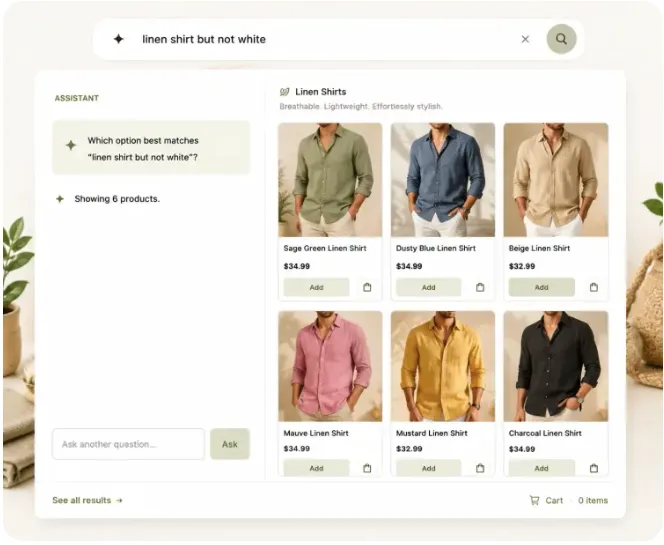
Support thematic and attribute queries, not just exact product names. "Cozy fall sweater" should return something.
Build in typo and spelling tolerance so a single misspelled character doesn't erase an entire result set.
Maintain synonym mapping between how you describe products internally and how shoppers actually talk about them.
Match on full product data, not just the title. Model numbers, materials, and use cases buried in descriptions should still be searchable.
This is where the underlying search technology matters more than any single fix. Keyword-matching search can be patched with synonym lists and manual redirects, but it's chasing an endless list of phrasings one at a time.
Search built to understand intent and natural language, the kind of AI-powered matching tools like Growsearch are built around, closes that gap structurally instead of one workaround at a time.
Recover From the Miss
When a query still comes back empty, the page a shopper lands on decides whether they stay or leave. Baymard's research points to a handful of things that consistently keep shoppers engaged instead of exiting:
Suggest related categories tied to words in their query
Offer alternative search terms with a preview of what those would return
Show personalized recommendations based on browsing history
Surface popular products or bestsellers as a fallback
Make live chat or a phone number visible for shoppers who want a human
Generic "check your spelling" tips don't move the needle here. Baymard's testing found shoppers rarely read or apply that kind of advice, and it can even give them a reason to leave rather than stay.
How to Find Your Zero Result Search Terms
Before you can fix zero result searches, you need to identify which queries are failing. Most ecommerce platforms and search tools collect this data, but many stores overlook it.
Your search analytics can reveal more than just failed queries. They show what shoppers are actively looking for, where your search experience breaks down, and where you're losing potential sales.
When reviewing your zero-result searches, focus on these metrics:
Metric | What It Shows |
Zero-result queries | The exact terms shoppers searched that returned no products |
Search frequency | How often shoppers use those failed terms |
Search-to-purchase rate | Whether shoppers using search are finding products and converting |
New failed searches | Emerging customer language or trends your catalog may not currently support |
Start with your highest-volume zero-result searches first. A query searched once may not require immediate attention, but a term searched hundreds of times represents repeated purchase intent that your store is failing to capture.
For example, shoppers may repeatedly search for “Kava drinks” while your catalog uses terms like “botanical beverages” or “functional drinks.” The products may already exist, but the search system fails to connect the shopper’s wording to the available products.
Regularly analyzing zero-result searches can help ecommerce teams identify:
Missing synonyms between shopper language and product terminology
Common spelling mistakes that prevent relevant matches
New product categories or customer interests
Product information gaps
Opportunities to improve search relevance
The challenge is that large stores can generate thousands of search queries every month, making manual review difficult. AI-powered ecommerce search tools can identify patterns in shopper behavior and improve how products match real-world search terms.
Zero Result Searches Are a Revenue Metric, Not a UX Detail
The instinct is to treat this as a design polish item, something to clean up eventually. But every zero-result search is a shopper who arrived with money to spend and left with nothing to show for it, often for a fixable reason: your search engine didn't understand a phrase it could have.
Tracking your zero-results rate, and treating a drop in it as a revenue win rather than a UX win, is the shift that actually gets this fixed instead of permanently deprioritized.
FAQs
What causes a zero result search?
Most commonly, a mismatch between how a shopper phrases their query and how your search engine matches product data, plus limited tolerance for typos, synonyms, and descriptive or thematic searches.
What is a good zero result search rate for ecommerce?
A lower zero-result rate generally indicates better search relevance, but there is no universal benchmark because it depends on catalog size, industry, and shopper behavior. The important metric is whether failed searches decrease over time and whether shoppers recover.
Are zero result searches caused by missing products?
Not always. Many zero-result searches happen because the search engine cannot interpret synonyms, typos, attributes, or natural-language queries, even when matching products already exist.
How do I know if zero-result searches are a problem on my store?
Pull up your search analytics and look for three numbers: total searches, zero-result searches, and how many of those zero-result terms are new. In the example below, 214 of 4,912 searches came back empty over 30 days — a real, trackable rate rather than a guess.
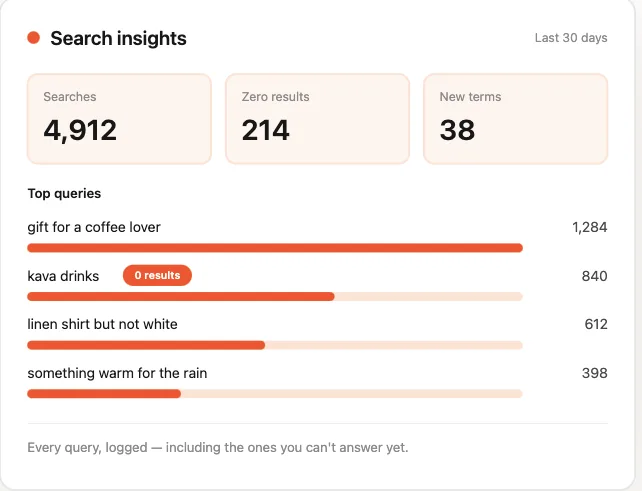
Notice "Kava drinks" sitting at 840 searches with zero results. That's not necessarily a missing product problem; it's a term the store hasn't matched yet, and it's now sitting in a queue instead of quietly costing sales every day it goes unaddressed.
Can better search technology fix this without rebuilding my catalog?
In most cases, yes. Tools like Growsearch work with your existing product data and use AI to understand intent, synonyms, and natural language queries, so the fix sits at the search layer rather than requiring you to rewrite every product listing.
Does fixing zero result searches actually increase sales?
Directly. Shoppers who search are already close to a purchase decision. Closing the gap between what they type and what you show them keeps that intent from walking out the door.
Final Takeaways
Zero result searches are missed buying opportunities, not simple UX errors.
Search failures often come from language mismatch, not missing inventory.
AI-powered search helps ecommerce stores understand intent beyond exact keywords.
Monitoring failed searches reveals customer demand and catalog gaps.