
Ecommerce Site Search: How It Works and How It Helps Online Stores Increase Sales
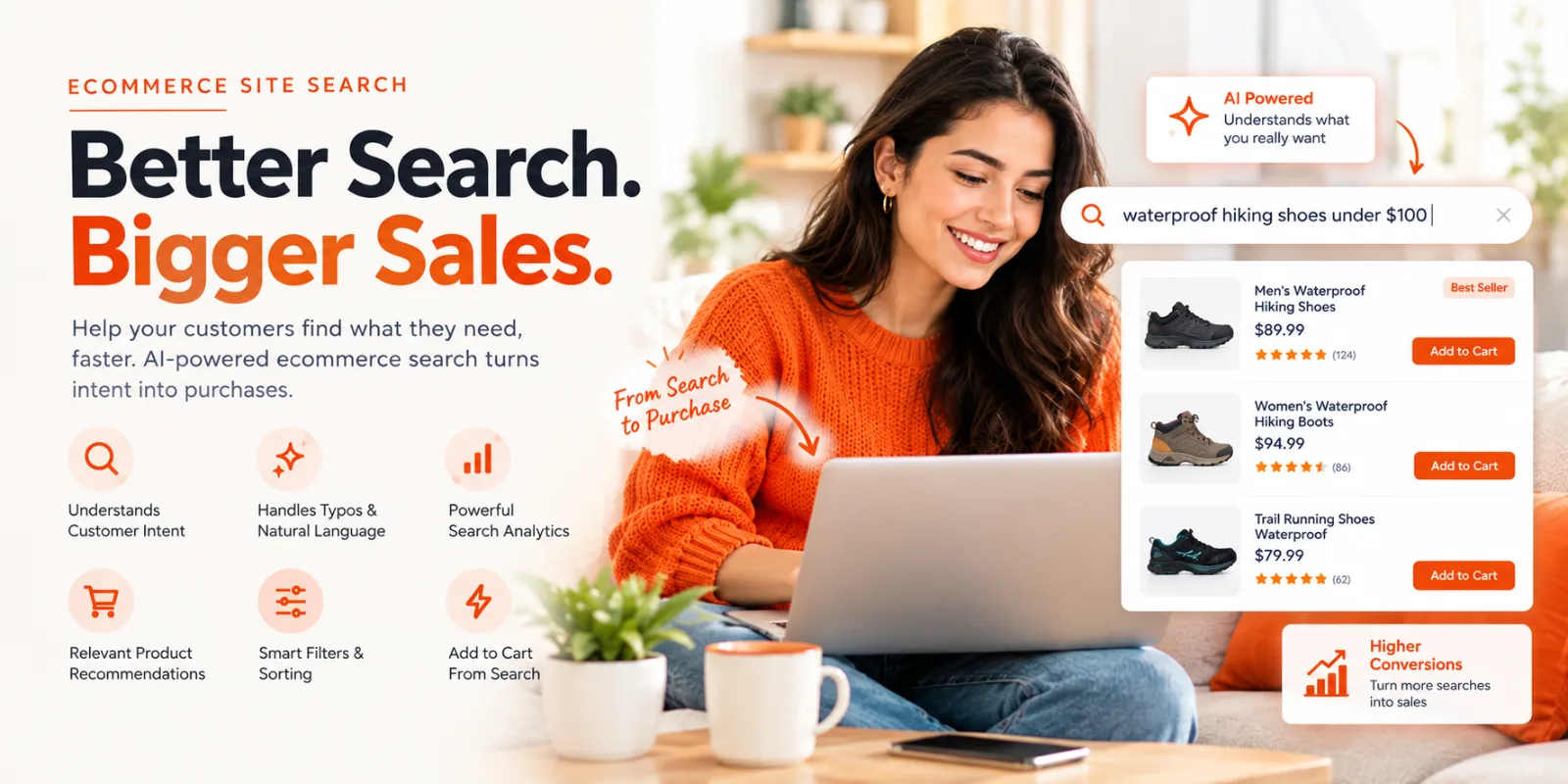
Every online store has one common challenge: helping customers find exactly what they need before they leave. You can have the best products, competitive pricing, and a great website, but if shoppers cannot quickly discover the right product, you are losing potential sales.
This is where ecommerce site search becomes important. Studies show that visitors who use site search can convert at a significantly higher rate than those who browse normally because they already have a clear buying intent.
But traditional search systems often fall short. A small spelling mistake, a vague product description, or a natural language query can lead shoppers to irrelevant results or a frustrating “no products found” page.
Modern ecommerce site search changes this by helping stores understand what customers are looking for, improve product discovery, and create a smoother path from search to purchase.
In this guide, we’ll break down how ecommerce site search works and how it helps online stores increase sales.
Key Takeaways
Ecommerce site search helps shoppers find products faster and improves product discovery.
Poor search experiences lead to zero-result pages, irrelevant results, and lost sales opportunities.
AI-powered search understands intent, handles natural language queries, and improves relevance.
Search analytics help stores understand customer demand and optimize their catalog.
Tools like GrowSearch help Shopify stores create smarter search experiences.
What Is Ecommerce Site Search?
Ecommerce site search is the search feature that helps shoppers find products directly within an online store. Instead of manually browsing categories, menus, and product pages, customers can type what they want and get relevant results instantly.
For example, a shopper searching for “black running shoes under $100” expects the store to understand more than just the words “black” and “running shoes.” They want products that match their preferred style, category, and price range.
Why Ecommerce Site Search Matters for Online Stores
Ecommerce site search matters because shoppers who use the search bar have strong purchase intent and convert at higher rates
💡Industry benchmarks show that 30% to 50% of ecommerce visitors use internal site search during their session.
An optimized search bar acts like a digital sales assistant. It guides high-intent buyers directly to checkout.
Key Benefits of Ecommerce Site Search
Higher Conversion Rates
Lower Bounce Rates
Valuable Customer Data
Better Personalization
💡Baymard's foundational search usability study found that 31% of all product-finding tasks fail when shoppers try to use on-site search — nearly one in three high-intent visits ending without a result.
Poor Search Creates Lost Sales Opportunities
A customer who uses your site search is already telling you what they want. They are not casually browsing; they are actively looking for a product. But if that search experience fails, the sale can disappear within seconds.
One of the biggest problems ecommerce stores face is the zero-result search. A shopper may type a product name, describe what they need, or make a small spelling mistake, only to see a “no products found” message. Without helpful alternatives or relevant recommendations, many customers simply leave and look elsewhere.
💡 Baymard Institute's 2026 ecommerce search UX benchmark found that 56% of ecommerce sites don't adequately support shoppers' search needs — meaning more than half the industry is still sending high-intent shoppers to irrelevant results or dead ends.
Irrelevant search results create a similar problem. If a customer searches for “waterproof hiking shoes” but sees unrelated footwear options, they have to spend more time filtering through products—or they may assume the store does not have what they need.
This leads to search abandonment, where shoppers leave the website because the search experience creates friction instead of helping them discover products.
A better ecommerce search experience guides customers from their initial query to the right products faster:
Search → Relevant Products → Product Page → Purchase
When search understands customer intent, handles variations, and surfaces the right products, it removes unnecessary steps between discovery and checkout.
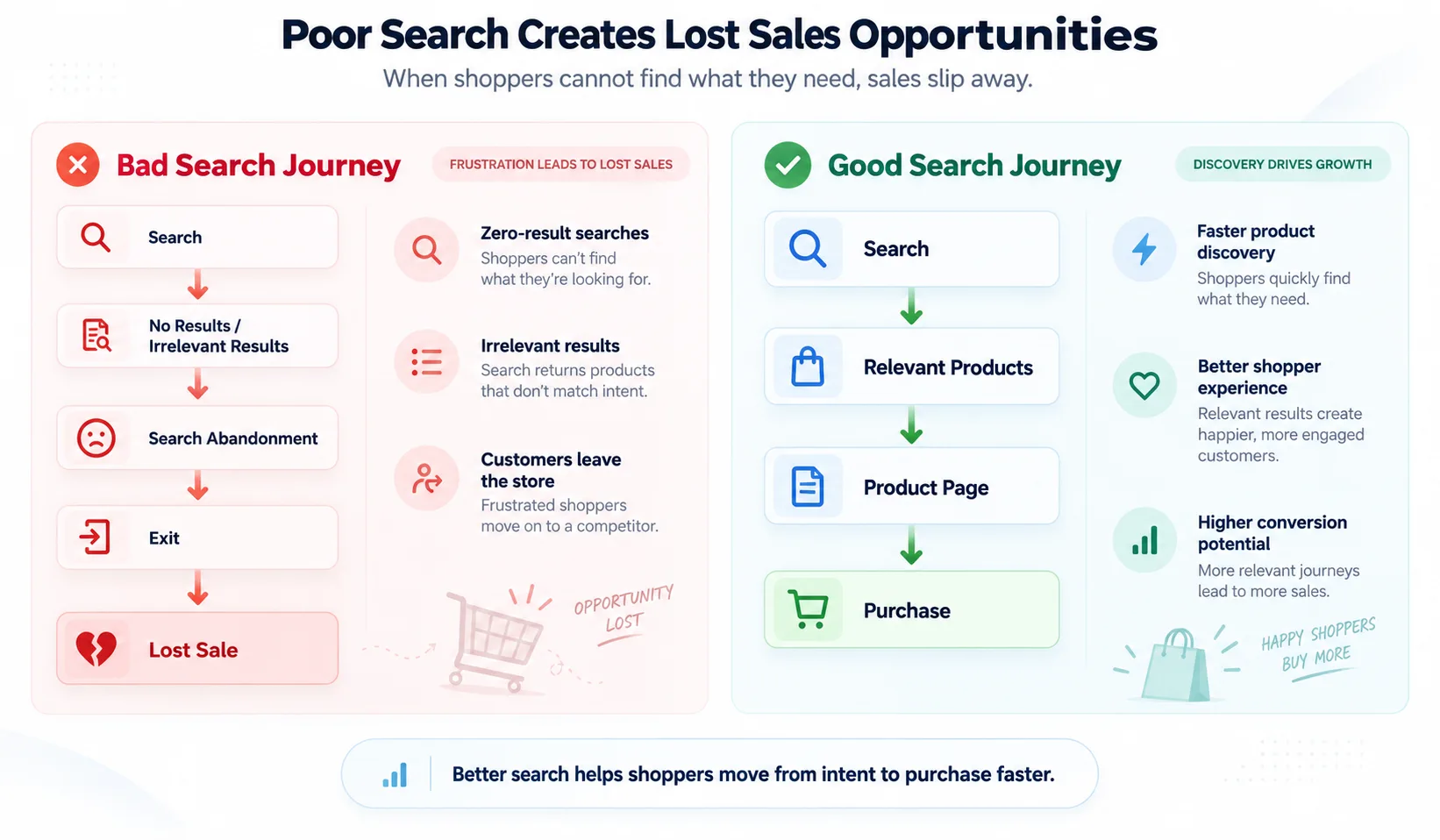
Better search keeps shoppers moving from intent to product discovery—and ultimately, purchase.
How Ecommerce Site Search Works
Every time a customer types something into your store’s search bar, several processes happen in the background before they see a list of products.
Here is how the process works:
Step 1: Query Input
The process starts when a shopper enters a search term into your store’s search bar.
This query could be:
A specific product name: “Nike running shoes”
A category: “wireless headphones”
A descriptive phrase: “comfortable office chair under $300”
A question: “What is the best laptop for students?”
The search system captures this input and begins analyzing what the customer is looking for.
For traditional search systems, this step is mostly about matching the exact words entered with product titles and descriptions. However, modern search systems go further by looking at the meaning behind the query.
Step 2: Search Engine Understands the Query
After receiving the search term, the search engine analyzes the query to understand the shopper’s intent.
This is where modern ecommerce search differs from basic keyword matching.
For example:
A shopper searching:
“Best foundation for oily skin under $20”
is not just looking for products containing the word “foundation.” They are looking for:
Product category: Foundation
Skin type: Oily skin
Budget preference: Under $20
This is the step where Growsearch does its heaviest lifting: every query is parsed for category, attributes, and budget before a single product is matched — which is why a phrase like "comfortable blue shirt for summer" returns real products instead of a blank page.
A modern search system can interpret these details and return products that better match the shopper’s intent.
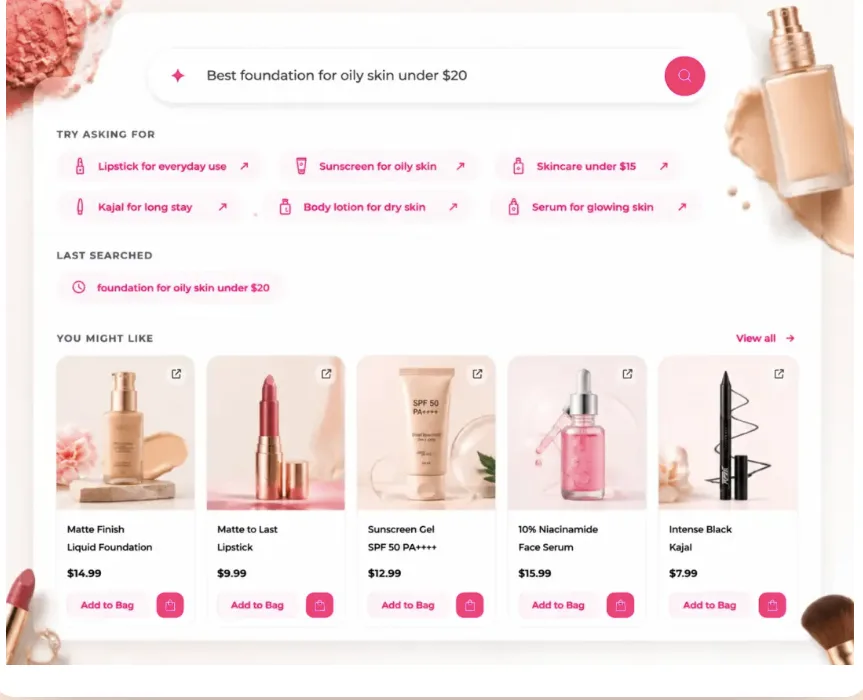
GrowSearch turns natural-language queries into relevant product recommendations based on shopper intent.
This helps the store return results that better match what the customer actually wants.
Modern search systems can also handle:
Typos (“iphne case” instead of “iPhone case”)
Synonyms (“sneakers” instead of “running shoes”)
Natural language searches (“summer dress for a wedding”)
Step 3: Products Are Ranked
Once the search engine understands the query, it determines which products should appear first.
Product ranking is influenced by multiple factors, including:
Relevance to the search query
Product availability
Product information quality
Customer behavior
Popularity
Store preferences
For example, if someone searches for “wireless earbuds,” the search system should prioritize products that match the query instead of showing unrelated accessories or out-of-stock items.
The goal is simple: put the most useful products in front of the shopper as quickly as possible.
Step 4: Results Are Displayed
The final step is showing the customer the search results.
A strong ecommerce search experience does not only display products. It helps shoppers make decisions with features like:
Product recommendations
Filters and sorting options
Product categories
Search suggestions
Quick add-to-cart options
For example, instead of showing hundreds of products, a good search experience helps shoppers narrow down results based on factors like price, category, size, color, or availability.
The easier it is for customers to find the right product, the fewer steps they need to take before completing a purchase.
Traditional Ecommerce Search vs AI-Powered Search
Feature | Traditional Search | AI Search |
Keyword matching | Yes | Yes |
Understands intent | Limited | Yes |
Handles typos | Basic | Advanced |
Natural language queries | Limited | Yes |
Product recommendations | Limited | Yes |
Answers questions | No | Yes |
Traditional ecommerce search was built around matching keywords. If a shopper searched for a product name or exact phrase, the system would look through product titles, descriptions, and tags to find matches.
That approach works for simple searches, but today’s shoppers search more naturally. They ask questions, describe problems, and use phrases that do not always match product data word-for-word.
For example:
Search query:
“Something warm for a rainy commute”
A traditional search system may struggle because it is looking for exact product keywords like “warm jacket” or “rain jacket.”
An AI-powered ecommerce search system understands the meaning behind the query and connects shoppers with relevant products.
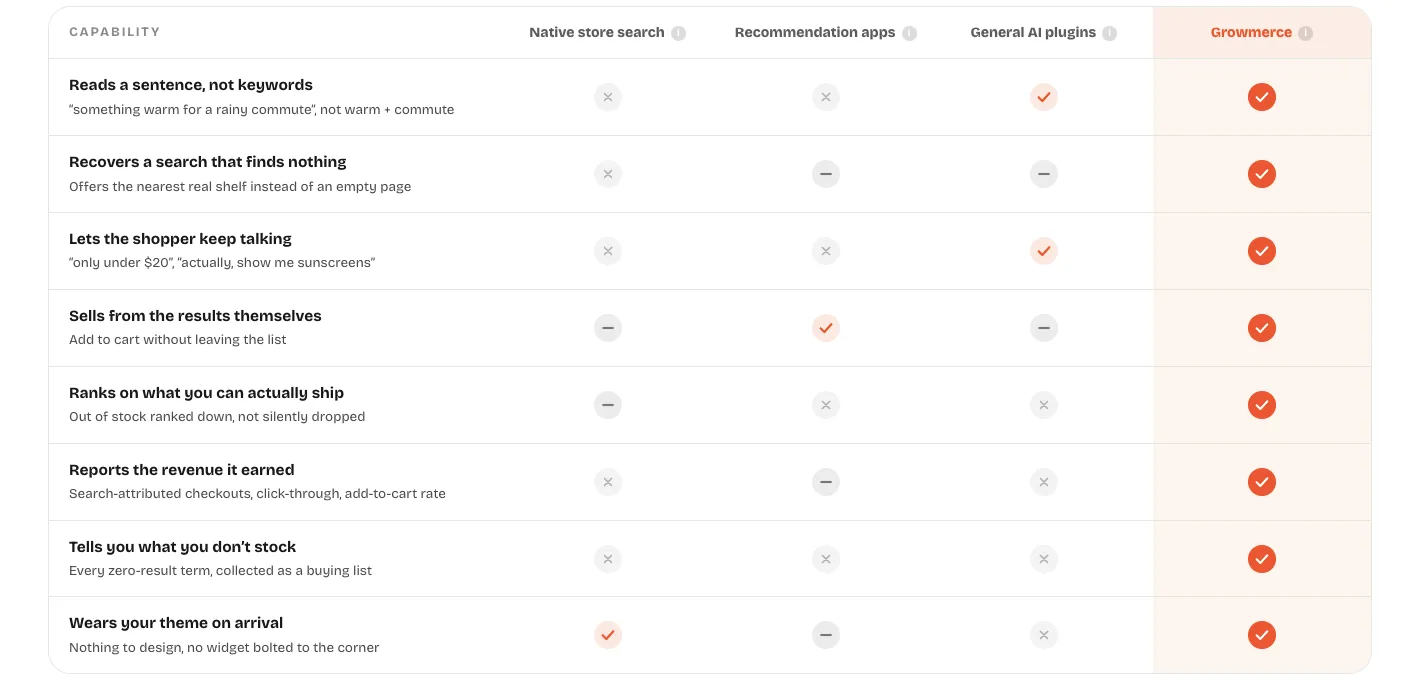
This comparison shows how AI-powered search goes beyond keyword matching to support the full shopper journey from discovery to purchase.
The difference is not just better search results. Modern ecommerce search helps stores create a smoother buying journey by:
Understanding natural language queries
Recovering from zero-result searches
Helping shoppers refine searches through conversation
Allowing customers to purchase directly from search results
Using search data to identify customer demand
Common Ecommerce Site Search Problems (And How To Fix Them)
A search bar alone does not guarantee a good search experience. Many ecommerce stores have search functionality, but customers still struggle to find the right products.
When search fails, the problem goes beyond a poor user experience. Every failed search can become a missed opportunity to convert a high-intent shopper.
Here are some of the most common ecommerce site search problems and how businesses can solve them.
Problem 1: Zero-Result Searches
A zero-result search happens when a customer searches for something, but the store returns no matching products.
For example:
A shopper searches:
“waterproof shoes for hiking”
But the store only has products listed as:
“outdoor boots”
Even if the store has relevant products, the search system fails to connect the two.
This creates friction at one of the most important moments in the buying journey. The customer came with purchase intent, but instead of finding options, they see a blank page and may leave.
How To Fix It:
Modern ecommerce search can reduce zero-result searches by:
Understanding synonyms and related terms
Showing similar products
Suggesting alternative searches
Learning from previous customer behavior
Instead of ending the journey with “no products found,” better search helps shoppers continue discovering relevant products.
This is the exact failure Growsearch is built to catch. Instead of matching only exact catalog terms, it reads the sentence — connecting "waterproof shoes for hiking" to a product listed as "outdoor boots" — and logs every zero-result term so store owners can see what shoppers wanted and didn't have.
Problem 2: Search Cannot Understand Natural Language
Customers do not always search like databases. They search the way they think.
Instead of typing:
“blue cotton shirt”
they may search:
“comfortable blue shirt for summer”
Traditional keyword-based search may look only for exact matches, making it hard to understand the shopper’s actual intent.
How To Fix It:
AI-powered ecommerce search uses natural language understanding to interpret what customers mean.
For example:
Search query:
“skincare products under $20”
The system can understand:
Category: Skincare
Price preference: Under $20
Shopping intent: Product discovery
This lets stores show more relevant products even when the exact keywords aren't in product titles.
Growsearch handles this the same way: a query like "skincare products under $20" gets parsed into category, price ceiling, and intent before it ever touches the product catalog — so results match what the shopper meant, not just what they typed.
Problem 3: Typos Lose Customers
Shoppers make mistakes all the time.
They might search for:
“iphne case” instead of “iPhone case”
“sneekers” instead of “sneakers”
“moisturizer” instead of “moisturizer”
A traditional search system may fail because it cannot match the incorrect spelling with the right products.
How To Fix It:
A better e-commerce search experience includes typo tolerance, which helps identify what customers likely meant and still returns relevant products.
Instead of showing:
No results found
the search experience can automatically correct the query or suggest the closest matching products.
This keeps shoppers moving instead of forcing them to restart their search.
Problem 4: Stores Cannot Learn From Search Data
Most stores focus on what customers buy but overlook what customers search for.
However, search behavior can reveal valuable insights:
Products customers are actively looking for
Searches that return no results
New trends before they become obvious
Missing product categories
Content gaps on product pages
Without this data, businesses miss opportunities to improve their catalog and customer experience.
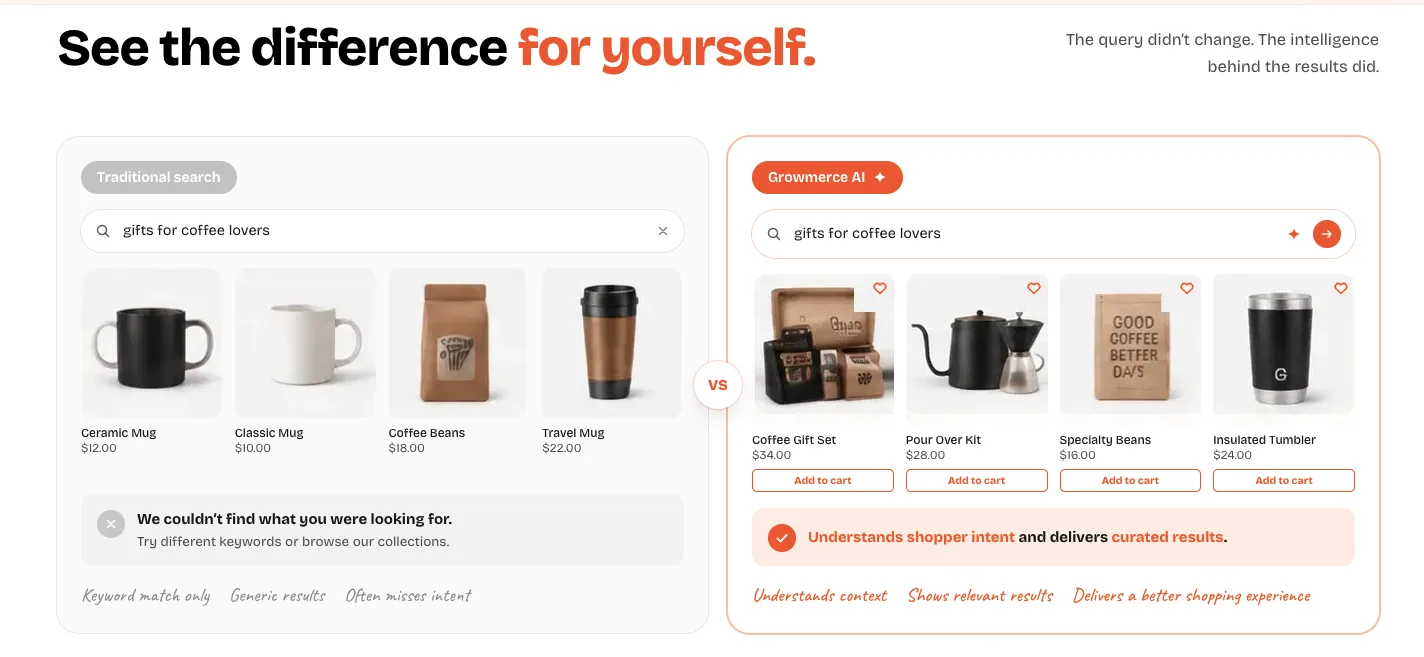
GrowSearch interprets shopper intent to surface more relevant, purchase-ready results from the same query
How To Fix It:
Modern ecommerce search platforms provide search analytics that help stores understand customer behavior.
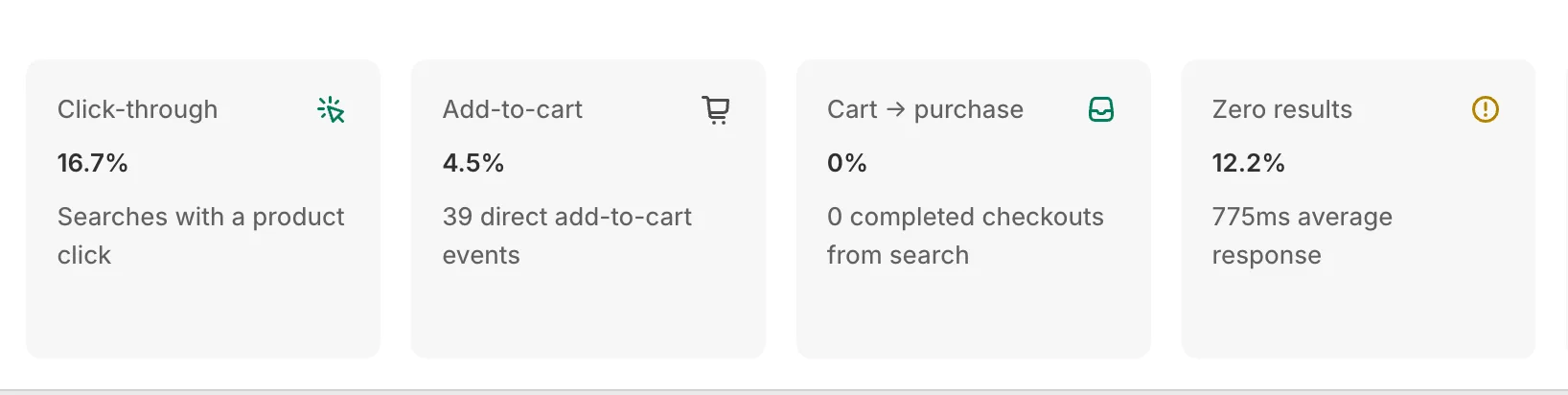
Growmerce Search analytics reveal where shoppers click, add to cart, drop off, or hit zero results—helping stores spot friction and improve the search experience.
For example, if hundreds of shoppers search for a product that is not available, that data can help businesses:
Add new products
Improve existing listings
Create better collections
Update product information
Search data turns customer intent into actionable insights.
Features Every Modern Ecommerce Search Solution Should Have
1. AI-Powered Search Understanding
2. Typo Correction
3. Natural Language Search
4. Search Recommendations
5. Product Ranking Controls
6. Search Analytics
7. Add-To-Cart From Search
Ecommerce Site Search Best Practices
A search bar alone is not enough to create a great shopping experience. To help customers find products faster, ecommerce stores need to continuously optimize how search works, what results appear, and how shoppers interact with them.
Here are some best practices for improving ecommerce site search:
Optimize Product Data
Search quality depends heavily on the information available about each product.
Make sure product titles, descriptions, categories, tags, and attributes include the details shoppers are likely to search for, such as:
Product type
Brand name
Size
Color
Material
Use case
Better product data helps search systems understand products and return more relevant results.
Track Zero-Result Searches
A search that returns no results is not just a failed query—it is customer feedback.
Monitoring zero-result searches helps stores identify:
Products customers are looking for
Missing product categories
Search terms that need better matching
Opportunities to improve product listings
Turning these failed searches into insights can help stores improve both search performance and merchandising decisions.
Use Search Analytics to Understand Customers
Search data reveals what shoppers want before they make a purchase.
By analyzing search behavior, stores can discover:
Popular customer queries
Trending products
Frequently searched categories
Products customers struggle to find
These insights help businesses make smarter decisions about inventory, collections, and product optimization.
Make Search More Flexible
Customers do not always use the exact words found in product catalogs.
A better search experience should handle:
Typos
Synonyms
Natural language queries
Different ways of describing the same product
For example, a shopper searching for “sneakers” should still find products listed as “running shoes.”
Improve the Mobile Search Experience
Many shoppers browse and purchase directly on mobile devices, so search speed and usability matter.
A mobile-friendly search experience should include:
Fast results
Clear filters
Easy-to-use search suggestions
Simple product discovery
The easier it is for shoppers to search on mobile, the fewer obstacles they face before checkout.
Keep Improving Search Based on Customer Behavior
Search optimization is not a one-time task. Customer preferences, product catalogs, and search patterns change over time.
Regularly reviewing search performance helps stores identify opportunities to improve relevance, reduce friction, and create a better shopping journey.
GrowSearch: AI-Powered Ecommerce Search Built for Shopify Stores
Most ecommerce search systems still depend on keyword matching, which can make it difficult for shoppers to find the right products. GrowSearch helps Shopify stores create a smarter search experience by understanding customer intent, handling natural language queries, and delivering more relevant results.
Instead of forcing customers to search using exact product terms, GrowSearch helps them find products using the way they naturally describe what they need.
For example:
“Skincare products under $10”
can be understood as:
Category: Skincare
Budget: Under $10
Intent: Product discovery
With features like AI-powered search, typo recovery, search analytics, and product discovery tools, GrowSearch helps stores reduce failed searches and create a smoother path from search to purchase.